
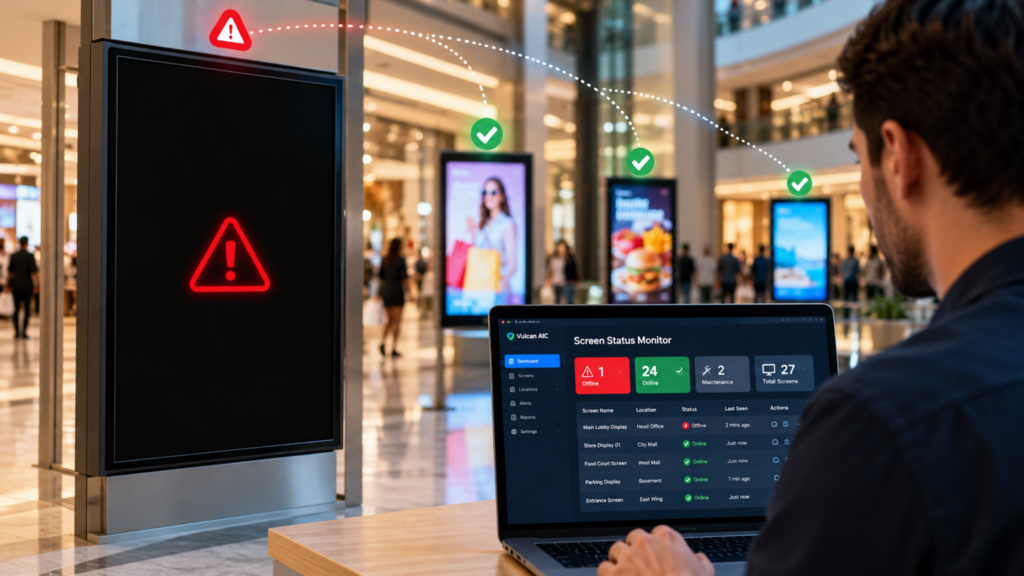
Real-Time Screen Status is an important part of managing digital displays in today’s connected business environment. Whether a screen displays advertisements, important announcements, highway information, or customer instructions, it needs to work when people depend on it.
Imagine walking into a shopping mall where a promotional screen has gone black. Customers pass by without noticing the offer. The marketing team continues paying for a campaign that nobody can see, and the store loses a valuable opportunity to engage potential buyers.
Now consider a highway information display that suddenly stops showing traffic updates. Drivers may miss important instructions, while the operations team remains unaware of the problem.
These situations have something in common: the screen has stopped doing its job, and nobody has noticed.
A black screen might appear to be a small technical issue. However, when businesses manage dozens or hundreds of displays across different locations, even a minor failure can create operational difficulties, wasted advertising expenditure, and unnecessary maintenance costs.
This is where real-time monitoring becomes valuable.
Instead of relying on occasional physical inspections or waiting for someone to report a problem, businesses can use monitoring systems to gain better visibility into the operational status of their displays.
In this guide, we will explore why screen monitoring matters, how it helps prevent avoidable downtime, and what businesses should consider when choosing a reliable monitoring solution.
Table of Contents
- What Is Real-Time Screen Status?
- Why Black Screens Are a Bigger Problem Than They Seem
- 7 Powerful Benefits of Real-Time Screen Status
- How Real-Time Screen Monitoring Works
- Common Reasons Digital Screens Go Black
- Industries That Benefit from Screen Monitoring
- What to Look for in a Screen Monitoring Solution
- Why Manual Screen Checks Are Not Enough
- How to Build a Smarter Screen Monitoring Strategy
- The Future of Real-Time Screen Monitoring
- Frequently Asked Questions
- Conclusion
What Is Real-Time Screen Status?
Real-Time Screen Status refers to the ability to monitor the operational condition of digital displays and identify potential issues as they occur or shortly after they occur.
Depending on the monitoring technology, a system may report whether a display is connected, whether its media player is responding, whether content playback is functioning, or whether a device has reported a technical fault.
More advanced systems may also support visual verification, allowing operators to check what appears on a screen rather than relying only on a device’s connection status.
This distinction matters.
A screen can remain connected to a network while displaying a blank image. Similarly, a media player may be running even though the display itself has developed a hardware problem.
A reliable monitoring strategy therefore considers more than whether a device is online.
It aims to provide useful information about the condition of the complete display setup.
What Does Screen Status Monitoring Actually Track?
The available information depends on the hardware, software, and monitoring platform being used.
Common monitoring capabilities include:
- Device connectivity: Whether the display player or monitoring device is reachable.
- Playback status: Whether the expected content is playing.
- System health: Whether the player is reporting errors or responding normally.
- Display status: Whether supported hardware can report its operating condition.
- Content verification: Whether the displayed output matches expectations, where visual monitoring is available.
- Alerts and notifications: Whether operators receive notifications when specific problems are detected.
Not every solution offers all these capabilities.
Businesses should understand exactly what a monitoring platform measures before assuming it can detect every type of display failure.
The goal is simple: replace uncertainty with actionable information.
Why Black Screens Are a Bigger Problem Than They Seem
A black screen does not always attract immediate attention.
In a busy retail store, employees may assume the display is temporarily switching content. In an office, a screen in a corridor might remain unnoticed for several hours. At a remote outdoor installation, the nearest technician may be kilometres away.
Meanwhile, the display continues to occupy space without delivering its intended value.
1. Lost Advertising Opportunities
Digital advertising depends on visibility.
When a screen stops displaying an advertisement, the campaign loses exposure during the affected period. For advertisers paying for screen time, this can create questions about delivery, campaign performance, and whether the agreed service was provided.
For network operators, repeated failures can also weaken relationships with advertising partners.
2. Delayed Operational Decisions
Some screens communicate more than promotional messages.
They may display queue information, schedules, directions, transport updates, or operational instructions. When these displays fail, staff may need to rely on manual communication until the problem is resolved.
The impact depends on the screen’s purpose, location, and the availability of alternative communication channels.
3. Higher Maintenance Costs
Without remote visibility, a business may discover a problem only when someone visits the site.
That visit can involve travel, staff time, troubleshooting, and replacement parts. If the actual issue is a loose cable or an unresponsive media player, the business may still incur unnecessary diagnostic costs.
Monitoring can help maintenance teams narrow down the problem before dispatching a technician.
4. Reduced Customer Confidence
People expect business displays to provide useful and timely information.
Repeatedly seeing blank screens can make an organisation appear less attentive to its infrastructure. In customer-facing environments, even small technical failures can influence the overall experience.
The real cost of a black screen is therefore not limited to the display itself. It also includes the time, opportunities, and confidence lost while the issue remains unresolved.
7 Powerful Benefits of Real-Time Screen Status
A well-designed Real-Time Screen Status system can help businesses move from reactive troubleshooting towards more informed display management.
Here are seven practical benefits.
1. Detect Problems Earlier
The sooner a fault is identified, the sooner someone can investigate it.
Without monitoring, an employee might report a blank screen at the end of a shift. With appropriate monitoring, an alert may reach the operations team much earlier.
For example, imagine a retail chain operating 80 digital displays across several cities.
Checking every screen manually each morning would require time and coordination. A central monitoring platform can help the team identify devices that have stopped responding and prioritise investigation.
However, early detection depends on the monitoring interval, the type of fault, and whether the system can observe the affected component.
The benefit is not that every problem disappears. It is that fewer problems have to remain invisible.
2. Reduce Display Downtime
Downtime is the period during which a display cannot perform its intended function.
A monitoring system helps shorten this period by making faults easier to identify and investigate.
For instance, if a media player becomes unresponsive overnight, the support team may be able to diagnose the issue remotely instead of discovering it during the next physical inspection.
Some platforms also support remote restart or recovery actions.
These features can be useful, but they must be configured carefully. Restarting a device will not fix every hardware, connectivity, or display-panel problem.
The practical objective is to reduce the time between failure, detection, diagnosis, and resolution.
3. Improve Advertising Accountability
For digital advertising networks, campaign delivery is closely connected to business performance.
Advertisers want confidence that their content has been displayed as expected. Network operators need reliable information to investigate complaints and demonstrate service quality.
Screen monitoring can contribute to this process by recording device health, playback events, or other relevant operational information.
When combined with suitable campaign logs and playback verification, these records can help teams understand whether a display interruption affected a campaign.
It is important to distinguish between device uptime and verified advertisement delivery. A connected player does not automatically prove that an advertisement was visible to viewers.
Businesses should select monitoring features that match their reporting and contractual requirements.
4. Manage Multiple Locations from One Place
Managing a few screens is relatively straightforward. Managing hundreds of screens across retail outlets, transport facilities, offices, and outdoor installations is a different challenge.
A centralised monitoring dashboard can bring device information together in one place.
Instead of contacting each location individually, authorised teams can review available status information remotely.
They may be able to identify:
- Which devices are offline.
- Which locations are experiencing repeated faults.
- Which players require investigation.
- Which issues need immediate attention.
- Which devices have recovered after troubleshooting.
This makes it easier to prioritize work according to operational importance. A display providing essential transport information, for example, may deserve faster attention than a screen showing a routine internal announcement.
5. Support Faster Maintenance
Maintenance teams need accurate information to make good decisions.
A monitoring alert that identifies an unresponsive player gives technicians a useful starting point. Historical logs may help them determine whether the issue is isolated or part of a recurring pattern.
With the right diagnostic tools, teams can sometimes resolve problems remotely. When a physical visit is necessary, they may be able to arrive with the correct replacement equipment and a clearer understanding of the fault.
Over time, this approach can improve maintenance planning and reduce avoidable site visits.
The key is to treat monitoring information as a troubleshooting aid rather than assuming that an alert always reveals the precise cause of a failure.
6. Protect the Customer Experience
Digital screens often sit at important customer touchpoints.
They may welcome visitors, explain services, promote products, provide directions, or display queue information.
When these screens work consistently, they help communication feel smooth and organised. When they fail repeatedly, customers may become confused or miss information.
Real-time monitoring helps businesses identify display problems before they remain unnoticed for extended periods.
For retail brands, hotels, hospitals, educational institutions, and transport operators, that visibility can support a more dependable customer experience.
7. Make Better Decisions Using Operational Data
A monitoring system can do more than flag individual failures.
When it retains useful historical records, it can help businesses identify recurring patterns.
For example, a facilities team might discover that displays in one location frequently lose connectivity. Another group of screens might experience repeated playback errors after scheduled software updates.
These patterns can guide practical decisions about network infrastructure, hardware replacement, maintenance schedules, and technical support.
Over time, the business can move beyond fixing individual problems and start addressing their underlying causes.
That is where monitoring becomes a long-term operational tool rather than just an alert system.
How Real-Time Screen Monitoring Works
Although implementations vary, most screen monitoring systems follow a similar process.
Understanding the basic workflow helps businesses assess which capabilities they actually need.
Step 1: Collect Device Information
A monitoring platform gathers information from supported displays, media players, monitoring agents, or connected management systems.
The information may include connectivity, device health, playback events, and error messages.
The exact data available depends on the equipment and software integration.
Step 2: Evaluate the Reported Status
The platform compares incoming information with expected operating conditions.
For example, a device might be flagged if it stops responding, reports a playback error, or fails to provide an expected status update.
Some systems also check whether content is being delivered as scheduled.
Step 3: Identify Potential Problems
When a monitoring rule is triggered, the platform marks the affected device for investigation. The severity of the alert can depend on the type of fault, how long the problem persists, and the operational importance of the screen.
This helps teams avoid treating every minor warning as an emergency.
Step 4: Notify the Responsible Team
Depending on the platform, alerts may appear on a dashboard or be delivered through supported notification channels.
Clear notifications should identify the affected device, location, issue, and time of detection whenever that information is available.
Step 5: Investigate and Resolve the Issue
The support team reviews the available diagnostics and determines the next step.
That could involve restarting a player, checking network connectivity, reviewing playback settings, or arranging a physical inspection. After the intervention, the team should verify that the screen has returned to normal operation.
This final step is important. Closing an alert without confirming recovery can leave the original problem unresolved.
Common Reasons Digital Screens Go Black
A black screen is a visible symptom, not a diagnosis. The underlying cause may involve hardware, software, power, connectivity, or content delivery.
Understanding the common causes helps teams troubleshoot more efficiently.
| Possible cause | What might happen | Recommended first check |
|---|---|---|
| Power interruption | The display or player switches off | Check the power supply and connected equipment |
| Loose or damaged cable | The display loses its video signal | Inspect connections and cable condition |
| Media player failure | Content stops playing or the output freezes | Check player health and system logs |
| Network disruption | Content updates or remote communication fail | Test connectivity and local playback |
| Software error | The application freezes or fails to load content | Review logs and application status |
| Display hardware fault | The panel fails to produce a normal image | Check supported hardware diagnostics |
| Incorrect content configuration | A blank or unsuitable asset appears | Review schedules, playlists, and media files |
| Overheating | Equipment becomes unstable or shuts down | Check ventilation and operating conditions |
These checks should be performed by appropriately authorised personnel, particularly where outdoor installations or electrical equipment are involved.
Why a Connected Device Can Still Have a Black Screen
This is one of the most important points to understand.
A monitoring dashboard might show that a media player is online. However, the display connected to it could still be blank because of a faulty cable, incorrect input selection, panel failure, or another issue.
In other cases, the screen may be working perfectly while the wrong content is being played.
This is why businesses should evaluate the difference between connectivity monitoring, playback monitoring, and actual visual verification. The most appropriate approach depends on how critical the display is and how much evidence the business needs before declaring it operational.
Industries That Benefit from Screen Monitoring
Real-time monitoring is useful wherever digital displays support regular communication, advertising, or operational activity.
Retail and Shopping Malls
Retailers use digital displays to promote products, communicate offers, and influence purchasing decisions. Monitoring helps teams identify failed screens, coordinate maintenance, and improve visibility across multiple stores.
For shopping malls with shared advertising networks, centralised monitoring can also help support service reporting.
Transportation and Highways
Transport environments may use electronic displays for directions, travel information, warnings, and traffic-related communication.
In these settings, the consequences of a display failure depend on the message being communicated.
Monitoring can help operators identify technical issues sooner. However, essential safety communications should always have appropriate redundancy, established escalation procedures, and suitable fallback arrangements.
A monitoring platform should support these measures, not replace them.
Corporate Offices
Businesses use screens for meeting-room information, internal announcements, visitor guidance, and workplace communication.
Remote monitoring helps facilities and IT teams manage displays across multiple floors or buildings without depending entirely on employee reports.
Hospitals and Healthcare Facilities
Digital displays may provide directions, appointment information, queue updates, and general announcements. Reliable operation helps visitors navigate facilities and access information more easily.
Where screens communicate time-sensitive or critical information, organisations should ensure that suitable alternative communication methods are available.
Educational Institutions
Schools, colleges, and universities use displays for notices, timetables, event information, and campus communication.
Monitoring helps IT teams identify faults across classrooms, corridors, libraries, and shared spaces.
Advertising and Digital Out-of-Home Networks
Advertising operators often manage displays across numerous sites, sometimes with different network conditions and maintenance requirements. Real-Time Screen Status can provide useful operational visibility across the network.
When combined with playback logs and appropriate verification, it can also support campaign reporting and help teams investigate interruptions.
What to Look for in a Screen Monitoring Solution
Choosing a monitoring platform requires more than checking whether it displays a green or red status indicator.
Businesses should evaluate the complete workflow, from detecting a fault to confirming that the issue has been resolved.
1. Accurate Status Reporting
Understand which components the platform monitors.
Does it check only the media player? Can it retrieve display hardware status? Does it provide evidence of content playback?
Clear answers help avoid assumptions about what an online status actually means.
2. Timely Alerts
Alerts should arrive quickly enough to support the business’s operational requirements.
Ask how frequently devices report their status and whether monitoring intervals can be configured.
Remember that a monitoring system may not detect every failure immediately.
3. Centralised Device Management
For multi-location businesses, a central dashboard can make monitoring easier.
Look for practical filters, location-based grouping, device-level details, and a clear overview of unresolved issues.
4. Useful Diagnostic Information
An alert that says only “device error” may not provide enough information to take action.
More useful systems include timestamps, device identifiers, recent status changes, and relevant error details.
The more useful the diagnostics, the easier it is to decide what to do next.
5. Remote Troubleshooting
Some platforms support remote actions such as restarting a player, refreshing an application, or updating configuration settings.
These features can reduce the need for site visits, provided the hardware supports them.
Remote actions should include suitable access controls and safeguards to avoid disrupting important services.
6. Reporting and Historical Records
Historical information can help teams identify recurring failures and evaluate operational performance.
Consider whether the platform records outages, recovery times, device status changes, and other relevant events.
Businesses should also understand how long these records are retained and whether they can be exported for internal reporting.
7. Security and Access Control
A connected display network should be managed with appropriate security measures.
Look for secure communication, access permissions, software updates, and clear procedures for managing administrator accounts.
Monitoring platforms should collect only the information needed for their intended purpose and protect it appropriately.
Why Manual Screen Checks Are Not Enough
Manual inspections remain useful. A technician can examine cables, check the physical condition of a display, inspect ventilation, and notice problems that a remote dashboard may not reveal.
However, manual checks have practical limitations when a business operates a large display network. First, inspections happen at particular times. A screen that works at 9 a.m. may fail at 11 a.m. and remain unnoticed until the next visit.
Second, reaching remote sites can be expensive and time-consuming.
Third, physical checks alone may not provide the historical information needed to identify recurring issues.
A better approach is to combine remote monitoring with planned maintenance.
Remote monitoring provides visibility between inspections, while physical checks help verify equipment condition and resolve faults that cannot be diagnosed remotely.
Together, these methods create a more complete maintenance strategy.
How to Build a Smarter Screen Monitoring Strategy
Buying monitoring software is only one part of the process.
To get meaningful results, businesses should define what they want to monitor, how alerts should be handled, and who is responsible for resolving issues.
Start with Your Most Important Displays
Not every screen carries the same operational importance. Identify displays that support essential communication, generate advertising revenue, or affect large numbers of customers.
These devices may require more frequent checks and faster escalation procedures.
Define What Counts as a Failure
Agree on the conditions that should trigger an alert.
For one business, a temporary network interruption may be a minor warning. For another, an extended loss of a critical information display may require immediate attention.
Clear definitions help teams respond consistently.
Assign Responsibility for Alerts
Every important alert should have an appropriate owner.
Decide who investigates technical issues, who contacts the site, and who escalates unresolved problems.
Without clear ownership, a monitoring system can generate alerts that nobody acts upon.
Establish Response Targets
Set realistic targets for acknowledging, investigating, and resolving faults.
These targets should reflect the criticality of each display and the resources available to the support team.
Review the targets regularly to determine whether they are practical.
Track Useful Performance Metrics
Several metrics can help evaluate a monitoring programme:
- Uptime: The proportion of time a display is operational during the defined measurement period.
- Mean time to detect: The average time between a failure occurring and the monitoring system detecting it.
- Mean time to repair: The average time required to restore normal operation after a failure.
- Repeat failure rate: How often the same device or fault experiences another incident.
- Alert resolution rate: The proportion of alerts resolved within a defined period.
The calculation method should be consistent across reporting periods.
For example, a business should specify whether planned maintenance is excluded from uptime calculations and whether a device is considered operational based on connectivity, playback, or verified visual output.
Without consistent definitions, performance comparisons can become misleading.
Review the Results and Improve
Use monitoring reports to identify the biggest recurring problems.
If several devices repeatedly lose connectivity at one site, investigate the network rather than treating each incident as an isolated failure.
If a particular model frequently develops hardware faults, review its maintenance history and replacement options.
The objective is to reduce recurring problems, not simply to produce more reports.
The Future of Real-Time Screen Monitoring
As digital display networks become more connected, businesses are looking for ways to manage them with greater accuracy and less manual effort.
Several developments are shaping this area.
AI-Assisted Fault Detection
Artificial intelligence may help identify unusual device behaviour, recognise patterns in operational logs, and prioritise potential problems.
For example, an analytics system might identify that a group of devices experiences repeated failures under similar conditions.
Such findings can help technicians investigate the underlying cause.
However, AI-based monitoring should be evaluated carefully. Detection accuracy depends on data quality, system design, and the types of faults the solution has been trained or configured to recognise.
Visual Verification
Some monitoring systems can use cameras, image capture, or other supported methods to check what a display is actually showing.
This can help identify problems that ordinary connectivity monitoring misses, such as a blank image or unexpected content.
Visual verification must be designed with appropriate privacy, security, and access controls, particularly in public or customer-facing locations.
Predictive Maintenance
Historical operational data may help teams recognise warning signs before a device fails completely.
For instance, recurring overheating alerts or repeated playback errors might indicate that a display needs attention.
Predictive maintenance is most useful when businesses have reliable historical data and a clear process for acting on the findings.
It should not be treated as a guarantee that every failure can be predicted.
Better Integration Across Systems
Display management platforms may increasingly integrate with ticketing systems, maintenance workflows, reporting tools, and broader IT infrastructure.
These integrations can reduce manual handoffs and help ensure that detected problems reach the appropriate team.
For businesses managing extensive display networks, the long-term opportunity is to create a more coordinated process in which monitoring, troubleshooting, and maintenance work together.
Frequently Asked Questions
1. What is Real-Time Screen Status?
Real-Time Screen Status is the monitoring of digital display conditions using connected devices, software, or other supported monitoring technologies. Depending on the solution, it may provide information about connectivity, playback, hardware health, or visible screen output.
2. Can Real-Time Screen Status detect every black screen?
No. Detection depends on the capabilities of the monitoring system.
A connectivity check may identify an offline player but miss a blank display connected to an otherwise functioning device. Visual verification or additional hardware diagnostics may be needed to identify certain faults.
3. How does screen monitoring reduce downtime?
It helps teams identify potential failures earlier, investigate them using available diagnostics, and coordinate corrective action. Some systems also support remote recovery features, which may reduce the time needed to restore normal operation.
4. Is remote screen monitoring suitable for small businesses?
Yes. Small businesses can benefit when they operate multiple displays or depend on screens for advertising, customer communication, or internal information.
The right solution depends on the number of displays, the consequences of failure, and the cost of monitoring.
5. What is the difference between screen monitoring and digital signage management?
Digital signage management generally focuses on creating, scheduling, distributing, and updating content across displays.
Screen monitoring focuses on operational visibility, such as device connectivity, playback health, and technical faults.
Some platforms combine both functions.
6. Can screen monitoring improve advertising performance?
It can help operators identify display interruptions and investigate whether campaigns were affected.
However, technical uptime alone does not prove that an advertisement was visible or viewed by an audience. Campaign reporting should use appropriate playback records and verification methods.
7. Does screen monitoring eliminate the need for technicians?
No. Monitoring helps identify problems and may support remote troubleshooting, but physical inspection and repair are still necessary for many hardware and electrical faults.
The purpose is to make technical teams more effective, not to remove the need for maintenance.
8. How should businesses measure screen uptime?
Businesses should define an operational state, a measurement period, and which exclusions apply.
For example, uptime could be based on verified playback rather than network connectivity alone. Consistent definitions are essential when comparing locations or reporting service performance.
9. Is Real-Time Screen Status useful for highway displays?
Yes, where the monitoring solution is compatible with the installed equipment and operating environment.
It can help operators identify technical issues affecting electronic information displays. For safety-critical installations, it should be supported by appropriate redundancy, escalation procedures, and alternative communication arrangements.
10. How can a business get started?
Begin by listing the displays that matter most, identifying the technical information currently available, and defining what constitutes a failure.
Then evaluate monitoring solutions based on detection capability, alerting, diagnostic information, security, integration, and reporting.
A small pilot across a representative group of displays can help establish whether the solution meets operational requirements before a wider rollout.
Conclusion: Don’t Let Black Screens Go Unnoticed
A digital display is useful only when it performs the job it was installed to do.
Whether that job involves promoting a product, sharing information, guiding visitors, or supporting transport operations, an unnoticed failure can interrupt communication and create unnecessary costs.
Real-Time Screen Status gives businesses a practical way to improve visibility across their display networks.
By identifying potential faults earlier, supporting remote troubleshooting, improving maintenance planning, and tracking recurring issues, monitoring can help teams manage displays more effectively.
The real advantage comes from combining accurate monitoring with clear responsibilities and a reliable response process.
A dashboard alone will not prevent every failure. But when the right technology is supported by the right workflow, businesses can spend less time discovering problems late and more time resolving them efficiently.
For organisations managing multiple digital displays, that shift can make a meaningful difference to day-to-day operations.
The question is no longer simply whether your screens are switched on. It is whether you have the visibility to know when they stop doing their job.

