
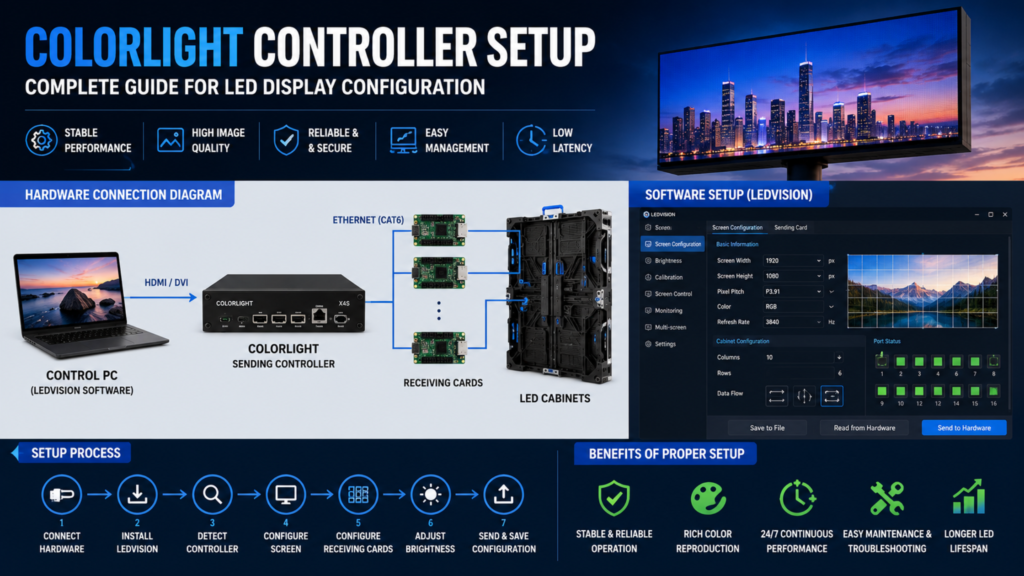
LED display technology has become the backbone of modern digital communication, powering everything from outdoor billboards and smart transportation systems to command centres, stadiums, airports, and commercial advertising displays. Behind every high-performance LED display is a reliable control system that ensures smooth image processing and flawless content delivery. One of the most widely used solutions in the industry is the Colorlight Controller Setup.
A proper Colorlight Controller Setup ensures your LED display operates with maximum efficiency, accurate color reproduction, stable communication, and minimal downtime. Whether you’re installing a new display or upgrading an existing system, understanding the setup process is essential for achieving optimal performance.
This guide explains everything you need to know about Colorlight Controller Setup, including hardware requirements, software configuration, troubleshooting, best practices, and common mistakes.
What is a Colorlight Controller?
A Colorlight Controller is an advanced LED display control system responsible for transmitting video signals from a media source to LED receiving cards installed inside LED cabinets.
It manages:
- Image processing
- Resolution mapping
- Brightness adjustment
- Signal transmission
- Synchronization
- Display calibration
Colorlight controllers are widely used in:
- Outdoor LED Billboards
- Smart City Displays
- Variable Message Signs (VMS)
- Command & Control Centres
- Sports Stadiums
- Airports
- Retail Digital Signage
- Corporate Video Walls
Why Proper Colorlight Controller Setup Matters
A professional Colorlight Controller Setup ensures:
- Stable display performance
- Accurate color calibration
- Smooth video playback
- Reliable communication
- Easy future maintenance
- Maximum LED lifespan
- Reduced downtime
Incorrect configuration can cause flickering, black screens, signal loss, or incorrect cabinet mapping.
Components Required for Colorlight Controller Setup
Before beginning the Colorlight Controller Setup, ensure you have the following:
- Colorlight Sending Controller
- LED Receiving Cards
- LED Cabinets
- Ethernet (CAT6/CAT6A) Cables
- HDMI or DVI Cable
- Windows Computer
- Colorlight LEDVision Software
- Power Supply
- Network Switch (for large displays)
Step-by-Step Colorlight Controller Setup
Step 1: Install the Hardware
Connect the controller to your LED display using high-quality Ethernet cables.
Connect:
- Computer → Controller
- Controller → Receiving Cards
- Receiving Cards → LED Modules
Ensure all power connections are secure before switching on the system.
Step 2: Install LED Vision Software
Download and install the latest LEDVision software compatible with your controller model.
The software allows you to:
- Configure display parameters
- Upload content
- Monitor hardware
- Adjust brightness
- Manage multiple displays
Step 3: Detect the Controller
Launch LEDVision.
Navigate to:
Settings → Device Management
The software automatically detects connected Colorlight controllers on the local network.
Step 4: Configure Screen Resolution
Enter the display resolution.
Examples:
- 1920×1080
- 1280×720
- 3840×2160
Incorrect resolution settings may result in distorted images.
Step 5: Configure Receiving Cards
Receiving cards must match the cabinet arrangement.
Configure:
- Cabinet Width
- Cabinet Height
- Number of Cabinets
- Data Flow Direction
- Port Mapping
Step 6: Brightness Calibration
Adjust brightness based on installation type.
Recommended:
- Indoor Displays: 600–1200 nits
- Outdoor Displays: 5000–8000 nits
Automatic brightness control can also be enabled using ambient light sensors.
Step 7: Save Configuration
Upload all settings to the controller and receiving cards.
Restart the controller if required.
Verify that all cabinets display content correctly.
Colorlight Controller Setup Software Configuration
A successful Colorlight Controller Setup also involves proper software optimization.
Configure:
Display Parameters
- Pixel Pitch
- Resolution
- Scan Mode
- Refresh Rate
Image Quality
- Contrast
- Saturation
- Gamma
- White Balance
Communication
- Ethernet Configuration
- Device Name
- Network Address
Monitoring
Enable:
- Temperature Monitoring
- Voltage Monitoring
- Cabinet Status
- Error Alerts
Common Colorlight Controller Setup Problems
Black Screen
Possible causes:
- Loose network cable
- Wrong resolution
- Incorrect cabinet mapping
Flickering Display
Check:
- Refresh rate
- Receiving card firmware
- Power supply stability
Color Mismatch
Recalibrate:
- RGB Values
- Brightness
- White Balance
Signal Loss
Inspect:
- Ethernet cables
- Controller ports
- Network switch
- Power supply
Best Practices for Colorlight Controller Setup
To ensure long-term reliability:
- Use CAT6 or CAT6A network cables.
- Keep firmware updated.
- Label all receiving cards and cabinets.
- Maintain backup configuration files.
- Test every cabinet before deployment.
- Use surge protection and UPS systems.
- Perform routine inspections and preventive maintenance.
Applications of Colorlight Controller Setup
A correctly configured Colorlight Controller Setup is used in a wide range of professional applications.
Intelligent Transportation Systems
- Variable Message Signs
- Highway LED Displays
- Traffic Information Systems
Smart Cities
- Public Information Displays
- Digital Wayfinding
- Emergency Alert Systems
Commercial Displays
- Shopping Malls
- Retail Stores
- Corporate Lobbies
Sports & Entertainment
- Stadium Scoreboards
- Concert LED Walls
- Event Screens
Industrial Control Rooms
- SCADA Displays
- Video Walls
- Monitoring Centres
Companies like Vulcan AIC deploy advanced LED display solutions integrated with intelligent control systems for highways, smart cities, command centres, and industrial infrastructure.
Advantages of Proper Colorlight Controller Setup
A well-executed Colorlight Controller Setup offers several benefits:
- Superior image quality
- Stable data transmission
- Easy scalability
- Simplified maintenance
- Faster troubleshooting
- Enhanced operational reliability
- Lower maintenance costs
Frequently Asked Questions
Which software is used for Colorlight Controller Setup?
LEDVision is the official software used for configuring, monitoring, and managing Colorlight controllers.
Can one Colorlight controller manage multiple displays?
Yes. Many Colorlight controllers support multiple output ports and can manage several LED cabinets or display sections, depending on the controller model and system design.
Why is my LED display flickering after setup?
Common causes include incorrect refresh rate settings, outdated firmware, unstable power supply, or communication issues between the controller and receiving cards.
Is Colorlight suitable for outdoor LED displays?
Yes. Colorlight controllers are widely used in outdoor billboards, traffic management systems, stadium displays, and smart city applications due to their reliability and scalability.
Conclusion
A successful Colorlight Controller Setup is essential for ensuring reliable, high-quality performance in modern LED display systems. From hardware installation and software configuration to calibration and troubleshooting, each step contributes to delivering seamless visuals and long-term operational stability.
At Vulcan AIC, we combine advanced LED display technology with expert engineering to deliver intelligent display solutions for smart infrastructure, transportation, industrial facilities, and commercial applications. Whether you’re planning a new LED display project or upgrading an existing installation, our team can help you build a reliable, future-ready digital display ecosystem.
Whether you’re deploying digital billboards, intelligent transportation systems, command centres, or commercial video walls, following best practices for Colorlight Controller Setup helps maximize display performance, simplify maintenance, and reduce downtime. Investing time in proper configuration today ensures your LED display infrastructure remains efficient, scalable, and future-ready.

